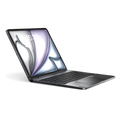
Premium-grade aluminum keyboard case, weighted at 2.38 lb for optimum stability. Solid on a desk, steady at any angle.
MAX View Hinge
Any angle, flat to upright. Find your perfect typing or viewing position instantly.
Multi-Touch Glass Trackpad
A full glass surface with true gesture support — MacBook Pro-level tracking and precision.
Adjustable Backlit Keys
Multiple brightness levels adapt to any lighting. Type comfortably, day or night.
Brydge MAX 13.0 - Aluminum Keyboard for iPad Air 13" & Pro 12.9"
$229
Compatible with:
iPad Air (2025) – M3 | 13-inch | Model A3268, A3269, A3271
iPad Air (2026) – M4 | 13-inch | Model A3461, A3462, A3464
iPad Pro (2018) – 12.9-inch (3rd Gen) | Model A1876, A1895,
A2014, A1983
iPad Pro (2020) – 12.9-inch (4th Gen) | Model A2229, A2069,
A2232, A2233
iPad Pro (2021) – 12.9-inch (5th Gen) | Model A2378, A2461,
A2379, A2462
iPad Pro (2022) – 12.9-inch (6th Gen) | Model A2436, A2437,
A2764, A2766
How to Find Your Model:
METHOD 1: On the back of your iPad - "Model A####" –
METHOD 2: Settings → General → About → Model Number
Customer Reviews
Overall rating: 4.4 / 5 from 56 reviews.
This has been the best purchase I could have ever done for my iPad. It works perfectly for what I was looking for. And not only that, but when I needed to contact support, their reply and response were far above anything I had hoped for. I cannot thank you guys enough for helping me.
One are of improvement that i strongly suggest is to enable (and if it could be done via a firmware upgrade, that would be even better for us existing customers) the ability to hold modifier keys when clicking on the trackpad. For instance, Cmd+Click to open links in a new window, or holding Shift to be able to select text blocks, or Ctrl+Click to select non-adjacent items. That would turn this already amazing piece of tech into the PERFECT iPad keyboard!
This thing is built like a tank! It’s hefty, and it looks great! It will take a minute to get used to the charging plug not charging the iPad but other than that, it’s perfect!
I have the iPad 12.9 Pro. I was originally going to get the 12.9 max + but something told me to wait. I saw the brydge 13.0 for the 12.9 and had to get it. It has an amazing build quality. The main hinge could be a bit tighter when opening up to laptop mode but overall no complaints.
This Brydge MAX 13.0 keyboard is EXACTLY as described. With the iPad 13 inch M4 others have ask what new laptop is that and who made it? Well I explained the keyboard is making the iPad look extra professional. The keyboard functions exceptional well. No CONS! .
Overall this is a great keyboard. The functionality is amazing, keyboards are more than sufficient and being able to utilise my ipad for work or for entertainment with ease makes this one of the best keyboards available.
My only gripes are the lack of an extra usb c port like Apple’s magic keyboard has, and the weight of the keyboard. Although I understand the weight allows me to type on this keyboard in any situation, and the battery life is one of the best in the market, if these two issues were tweaked, your competition for alternative iPad keyboards would go out of business.
Great addition to make my iPad Air 13” a more professional usable tool. It is a bit heavy but that comes with quality. Keystrokes are great as responsiveness as well. Also the top keys with functions are great. To be added feature for new release is that the iPad is charged through the Brydge. As compared to magic keyboard from Apple you now lose a USB-c port to connect a extra screen or phone.
I’ve been a loyal Brydge customer since the very beginning, when I first backed and followed the original Brydge keyboard after it was introduced on Kickstarter. I’ve loved the company’s products ever since, and the new Brydge MAX 13.0 continues that tradition.
The MAX 13.0 for my iPad Pro 12.9 is everything I was hoping for. The all-aluminum construction feels incredibly premium, the keyboard has a fantastic typing experience with excellent key travel, and the large precision trackpad is smooth and responsive. It truly transforms my iPad into a laptop-like workstation while still giving me the flexibility of a tablet whenever I need it.
What has always impressed me about Brydge is the attention to detail. The sturdy hinge, solid build quality, and thoughtful design make this feel like a natural extension of the iPad instead of just another accessory. After using Brydge products for years, it’s great to see the company continue to build on the vision that first caught my attention over a decade ago.
If you’re looking for a premium keyboard case that delivers an outstanding typing experience, excellent stability, and beautiful craftsmanship, I highly recommend the Brydge MAX 13.0. It’s another outstanding product from a company I’ve been proud to support since day one.
Every bit as good as any laptop! I love the increased functionality of the iPad with the backlit keyboard and trackpad. It does everything I hoped and more. Great quality as well. Thank you for the wonderful product!
I love the flexibility of the case with my iPad. It’s much more comfortable and balanced to use on my lap than the Logitech case I had. While the aluminum case is sturdy, it is VERY heavy and it gets cold at times. But it still does the job and I’m very happy with it.
Absolutely love my Brydge! I primarily use my iPad for work, so having easy access of switching it between an upright iPad and essentially a MacBook has been a total game changer. When I had issues with my device, customer support was incredible to work with and sent me a new replacement product. 10/10 experience, can’t recommend this product and company enough!
Great product. Great value.Was coming from a magic keyboard on my old 2018 iPad Pro 12.9" and looking for something new for a M4 iPad Air 13" and thought I'd try it. It's quite a bit heavier and does not have the smart connector but those are the only downsides. This makes my iPad feel much closer to a tradtional laptop experience and I'v enjoyed it so far.
It fits well and works well. The only deficit was a secure place for my Apple Pencil. I almost returned it to you because losing the pencil is both expensive and inconvenient, however I did some research and purchased a Moft pencil holder that works like a dream. Problem solved!
We’ll see. I just opened it and connected it today. I had THREE 12.9 units (2 replacements) and the plastic hinge on the back broke in the same place on all of them! Very light usage sitting in my chair in front of the TV. Always stored flat on my table next to my chair. So until I use it for some months and see if it breaks, I’m not giving it a final review.
On the surface looks and feels cool. We’ll see…
I have this on my 12.9” M2 iPad. It makes the iPad look like a laptop, and it’s got more/better viewing angles than Apple’s Magic Keyboard. Typing is very nice and the keyboard wakes up very quickly and never fails to connect. Overall, I’m happy with it. But it’s not perfect, and you should be aware of these things going in:
1. It is much thicker and heavier than any other keyboard case I’ve used. Dimensionally, it’s thicker and heavier than my 15” MacBook Air. So if you’re hoping for a lightweight option for travel, this isn’t it.
2. The trackpad is super sensitive and I got a lot of false touches that would move the cursor and mess up what I was typing. You can go into the settings and turn of tap to click, and that helps immensely, but if you’re a tap to click person, this is not the keyboard for you.
3. The all-metal design is all metal except for the hinge, which is plastic. I hope it holds up, but past experiences with Brydge’s original keyboard design and its troublesome plastic hinge is a reason for concern.
Overall, I’m happy with it. Looks great, super flexible, and the typing is great. But it’s not perfect and not for everyone.
It's almost exactly like working on a laptop which was my desire.
It doesn't always start right away when I open it, which the Apple Magic Keyboard did. But it does always eventually start up and the typing experience is great.
Better than the Magic Keyboard.
“This is a game-changer and feels like the first true premium competitor to Apple's Magic keyboard.”
Andrew O'Hara · AppleInsider
Key features
Multi-Touch Trackpad
All-Aluminum Case
MAX View Hinge
Magnetic SnapFit™ Case
Instant-On™ Connectivity
Adjustable Backlit Keys
Full multi-touch gesture support
Swipe between apps. Scroll through documents. Select text with precision.The glass trackpad surface is also smooth, responsive, and accurate.
Feel The Difference.
Machined from premium aluminum with a finish that matches your iPad. Not just a case. A complete keyboard designed specifically to enhance your iPad experience
Find Your Angle - 270° of viewing freedom.
From focused work to casual use, the MAX View Hinge holds your iPad exactly where you need it. Smooth movement. Secure positioning. Built for stability.
Secure by design.
Drop your iPad in and the SnapFit case takes care of the rest. Strong magnets lock it in place, protected front and back, ready whenever you are.
Open and Work. Instantly.
With Instant-On™ connectivity, your keyboard wakes up the second you hit a key, saving valuable battery life so you can dive straight into your workflow without a single second of waiting. Just open, type, and let the MAX 11.0 automatically reconnect to your iPad. Skip the frustrating pairing menus and power buttons.
Work in any lighting conditions.
Adjustable backlit keys that keep every letter perfectly visible, day or night.
Full-size keys with 1.3mm travel deliver tactile feedback designed for extended typing session
MAX View Hinge - one hinge, every angle
Set it and forget it
Movie mode - Locked in
Opens flat like an easel
Feel the difference.
Most keyboard cases are made of plastic. The MAX 11.0 is machined from premium aluminum, matched to your iPad's finish. Every detail considered. Not just a case. A complete keyboard designed to enhance your iPad experience.
Your office just got an upgrade.
The MAX 11.0 was built for the real world. Adjustable backlit keys adapt to any environment, from a dimly lit bar to a bright open-plan office. All-day battery means no excuses, no compromises, wherever the day takes you.
Type more.
Do more.
Full-size keys with 1.3mm travel deliver a typing experience that genuinely rivals a MacBook Pro. The all-glass trackpad supports Apple gestures natively, swipe, scroll, and select with precision. Backlit and adjustable. Built for the way you work.
But wait, there’s more
Trackpad on/off
Toggle it on or off instantly, so your iPad works exactly the way you want it to.
Available in multiple colors
Choose the finish that complement your iPad and your style.
Multimedia shortcuts
A dedicated row of shortcut keys puts volume, brightness, and media controls one tap away.
Compatibility
iPad Air 13-inch (M3 & M4) and iPad Pro 12.9-inch (3rd, 4th, 5th & 6th Gen)
iPad Air (2025) – M3 | 13-inch | Model A3268, A3269, A3271
iPad Air (2026) – M4 | 13-inch | Model A3461, A3462, A3464
iPad Pro (2018) – 12.9-inch (3rd Gen) | Model A1876, A1895, A2014, A1983
iPad Pro (2020) – 12.9-inch (4th Gen) | Model A2229, A2069, A2232, A2233
iPad Pro (2021) – 12.9-inch (5th Gen) | Model A2378, A2461, A2379, A2462
iPad Pro (2022) – 12.9-inch (6th Gen) | Model A2436, A2437,A2764, A2766
Model & Colours
COLORS
Brydge Max 13, Carbon Gray
Brydge Max 13, Silver
Brydge Max 13.0,Carbon Gray Chrome
MODEL NUMBER
BRY6042
BRY6043
BRY6044
Size & Weight
SIZE
Length: 11.14 in (283 mm)
Width: 8.46 in (215 mm)
Height: 0.31 – 0.71 in (7.8 – 18 mm)
Weight: 2.38 lb (1.08 kg)
Battery Life
WITHOUT BACKLIGHT
Up to 3 months at 2 hours use per day with no backlight use. Rechargeable via USB-C cable
WITH BACKLIGHT
Up to 40 hours per charge with consistent backlight use. Rechargeable via USB-C cable.
What's in the Box
ITEMS
Brydge Aluminum Keyboard
Quick start guide
Note: USB-C charging cable is not included.
Warranty
WARRANTY
1-Year Limited Warranty
Frequently Asked Questions
Didn’t find the answer you were looking for?
Our support team is here to help. We’ll be happy to assist with any additional questions.
This MAX 13.0 fits the iPad Air 13" (M3 & M4) and iPad Pro 12.9" (3rd–6th Gen, 2018–2022). For the iPad Pro 13" (M4/M5), see the other MAX 13.0 listing built for that model.
Why this changed: scoped to this specific listing; also clarifies this is a different iPad Pro size (12.9") than the other MAX 13.0 page (13"), which the current shared answer doesn't distinguish.
Open the keyboard and your iPad connects instantly no buttons, no pairing menus. Once paired it stays connected for up to 4 hours before sleeping, without affecting battery life.
Yes. Press Fn + Space to toggle the trackpad on or off instantly. Useful for focused typing sessions.
Up to 3–6 months on a single charge depending on backlight use. Charges via USB-C in under 4 hours.
Yes the SnapFit case keeps all ports accessible including the Apple Pencil charging port on compatible iPad models.
Detach your iPad and power the keyboard off first. Wipe the aluminum body and keys with a soft, lint-free microfiber cloth — lightly dampened with water if needed, then dried. Use a soft dry brush for crumbs between the keys.
Never spray liquid directly onto the case, and avoid bleach, ammonia-based glass cleaners, solvents, and abrasive pads — they can dull the anodized finish. If you want to disinfect, use a 70% isopropyl alcohol wipe sparingly on the keys and trackpad only.
Global Shipping
Fast, reliable shipping to over
50 countries worldwide.
1-Year Warranty
Built to last. We stand by our quality
Easy Returns
30-day money-back guarantee for ultimate peace of mind.
Choosing a selection results in a full page refresh.