Skip to product information
1 of 6

Brydge MAX 11.0 - Aluminum Keyboard for iPad Pro 11" (M4/M5)

Brydge MAX 11.0 - Aluminum Keyboard for iPad Pro 11" (M4/M5)
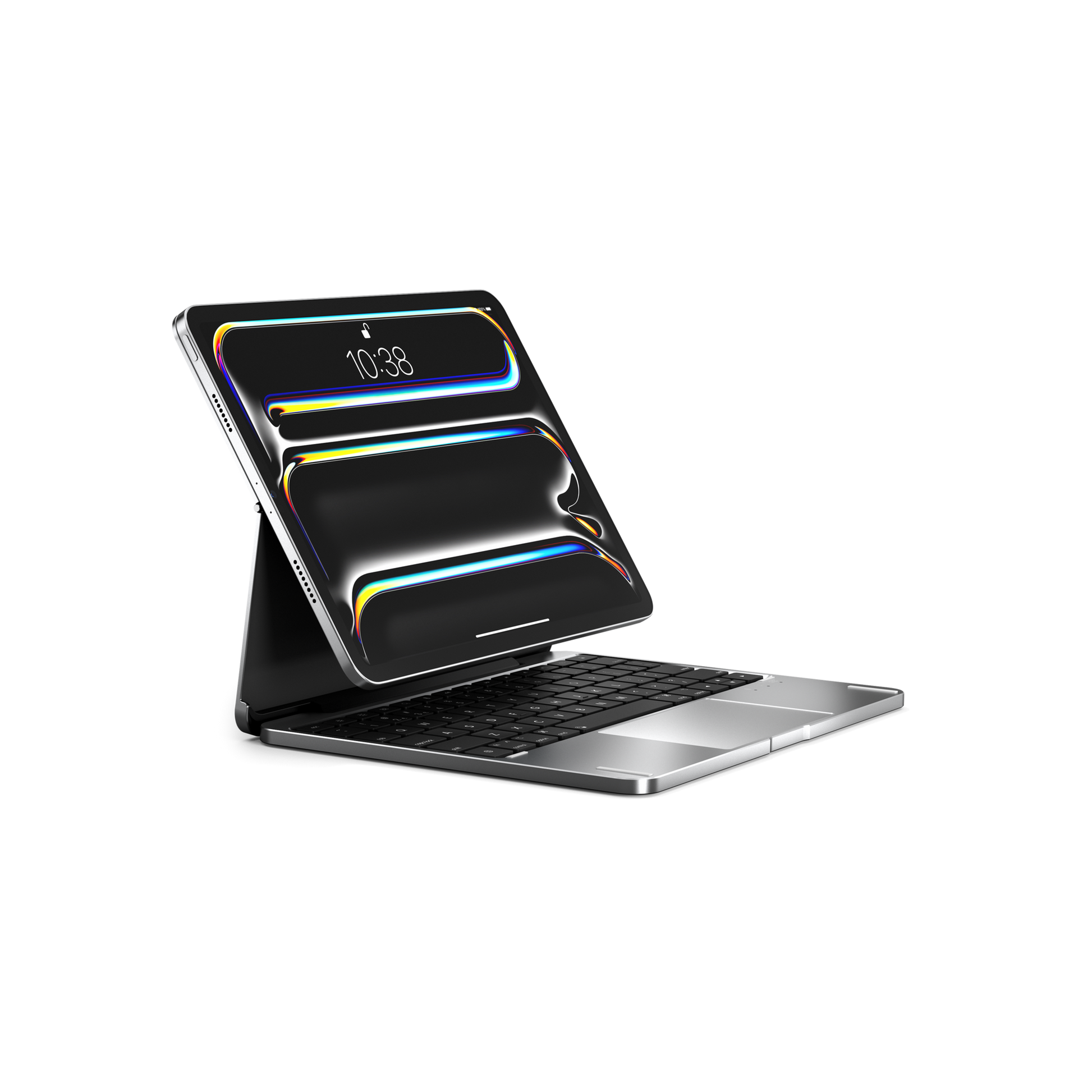
Get real work done on your iPad. Aluminum keyboard, glass trackpad and a MAX View hinge for any angle.

Compatibility: For iPad Pro 11-inch (M4 & M5)

Regular price $229
Regular price Sale price $229

In-stock

Colors: Silver

Black Friday: 35% off. You pay $149 (save $80)

Applied automatically at checkout

View full details

Free US Shipping
Arrives 2–4 business days

Free US Shipping
Arrives 2–4 business days

30-day returns

1-year warranty

Not sure which iPad?

Why Brydge MAX 11.0

All-Aluminum Keyboard Case

All-Aluminum Keyboard Case

Premium-grade aluminum keyboard case, weighted at 1.72 lb for optimum stability. Solid on a desk, steady at any angle.

MAX View Hinge

MAX View Hinge

Any angle, flat to upright. Find your perfect typing or viewing position instantly.

Multi-Touch Glass Trackpad

Multi-Touch Glass Trackpad

A full glass surface with true gesture support — MacBook Pro-level tracking and precision.

Adjustable Backlit Keys

Adjustable Backlit Keys

Multiple brightness levels adapt to any lighting. Type comfortably, day or night.

Compatible with:

Compatible with:

iPad Pro (2024) – M4 | 11-inch | Model A2836, A2837, A3006

iPad Pro (2025) – M5 | 11-inch | Model A3357, A3358, A3359

How to Find Your Model:

METHOD 1: On the back of your iPad - "Model A####" –
METHOD 2: Settings → General → About → Model Number

Customer Reviews

Overall rating: 4.2 / 5 from 26 reviews.

I am really happy with this purchase. I can’t really complain at all. I thought that the screen detaches from the keyboard and there was like a little case that comes with it, but no, it doesn’t. It’s basically one of the best keyboards out there, aside from the magic keyboard that’s competing with it. I own quite a few, and I do like this one. It’s very sturdy. If you’re not into heavy then you should rethink this because it’s quite heavy with the case because it’s made out of premium materials, obviously, but this isn’t something that if it were to fall I would be like oh no problem, given how much it cost

Brydge MAX 11.0 - Aluminum Keyboard for iPad Pro 11" (M4/M5)

Excellent OEM quality keyboard integrated with an M5 11 inch IPad. I have only had a few days yet I am extremely satisfied with the keyboard functions and its functionality. I feel quite enamored with my investment.

Brydge MAX 11.0 - Aluminum Keyboard for iPad Pro 11" (M4/M5)

I'm a long time Apple customer and supporter but not when it comes to their keyboards for iPad. Brydge is making the keyboard Apple should be making. It is sturdy, reliable, feels good and at a decent price. It is a little heavy but offers great protection for my iPad Pro.

Brydge MAX 11.0 - Aluminum Keyboard for iPad Pro 11" (M4/M5)

Everything is great. I wish there was a control for the backlight keypad because I can't find anything.

Brydge MAX 11.0 for iPad Pro 11-inch (M4 & M5)

Store owner replied: Hi David, the keyboard backlight is adjusted using the dedicated backlight key on the top function row. Press the backlight key repeatedly to cycle through the brightness levels (Off → Low → Medium → High). Hope this helps

Customer photo review of Brydge MAX 11.0 for iPad Pro 11-inch (M4 & M5)

I think this is the BEST keyboard you can get for your iPad in terms of build quality and feature set. The hinge is strong and supports all the advertised angles in a stable manner, and I’m NOT worried about it losing strength over time. It’s made completely out of aluminum, which I specifically looked for over Apple’s Magic Keyboard because aluminum is easy to clean and keep clean. Apple’s flagship Magic Keyboard is made up of some organic material that over time can get stains which I did NOT want, so it was awesome to stumble upon this keyboard online! This keyboard feels weighty without being too heavy so that your iPad doesn’t topple over right away on your lap if you let go (it still will, but slower). That is another problem with Apple’s version—Apple’s keyboard weighs like nothing, so it did not feel balanced. I think BRYDGE’s designers did a good job trying to balance out the iPad’s top-heavy weight! (Not sponsored btw) It has beautiful chamfered edges that catch the light as you pick it up and carry it around, harkening back to Apple’s iPhone 4 and iPhone 5S design language. It looks stunning. It has little rubber pads on the palm rests for you to rest your iPad when you have it at different configurations so you don’t scratch your iPad. The weakest point would probably have to be the keys. The plastic looks dull, akin to a kid’s toy laptop. It looks out of place for a product that seems so meticulously engineered. I wish it wasn’t so, because the keyboard takes up so much of the appearance. Though the typing experience is good. If you’re on the fence about this or Apple’s, really, get this!

Brydge MAX 11.0 for iPad Pro 11-inch (M4 & M5)

Excellent product for the look, feel and performance. I’m very glad I bought this for my 2024 iPad Pro 11.

Brydge MAX 11.0 for iPad Pro 11-inch (M4 & M5)

Store owner replied: Hi Gary, Thank you for sharing your experience with us, it's very much appreciated.

Customer photo review of Brydge MAX 11.0 for iPad Pro M4/M5

I like it

Brydge MAX 11.0 for iPad Pro M4/M5

Store owner replied: Wow it looks like a great set-up Theodor. We are delighted that you are so happy with your purchase. Thank you for taking the time to share your experience.

I've been using this keyboard for a few weeks and I'm very impressed with the build quality, functionality, and finish. My iPad doubles as my laptop and the Max 11.0 lives up to its billing as being built to replace your laptop. The max view hinge is the best I've experienced with any keyboard, allowing you to use it in a variety of ways, it's also very stable on your lap unlike cheaper plastic keyboards. The trackpad and keyboard are very responsive and the all-aluminum build reinforces the impression that you've got a premium product in your hands."

Brydge MAX 11.0 for iPad Pro 11-inch (M4 & M5)

Store owner replied: Hi Calvin, it’s genuinely great to hear that it gives a laptop experience as this was one of our main goals in the design. Thanks for taking the time to share your experience with us.

The keyboard is very comfortable to use and the keys are much better than the Apple Magic Keyboard. That said, it’s best used as a desktop keyboard; it simply too heavy and it eliminates one of the best things about an ipad vs. a laptop.

Brydge MAX 11.0 - Aluminum Keyboard for iPad Pro 11" (M4/M5)

Frustrating. The user guide that came with it actually belonged to a previous model per customer service. The online version also does not mirror the latest version.

Brydge MAX 11.0 - Aluminum Keyboard for iPad Pro 11" (M4/M5)

Store owner replied: Hi William, we are updating our online manuals to reflect the latest changes - apologies for the confusion.

We recently purchased two Brydge keyboard cases—one for the 11-inch iPad Pro (1st generation) and one for the newer 2026 11-inch iPad Pro. The products themselves are of a good build quality, exactly what I expected from Brydge. Unfortunately, the overall experience was tarnished by the delivery process. Shipping took much longer than expected, and I was also hit with unexpected import charges of approximately £50 per keyboard, which significantly increased the overall cost. This wasn’t made sufficiently clear at the time of purchase and came as an unwelcome surprise. If you’re ordering from the UK, I’d recommend factoring in the additional import costs and allowing plenty of extra time for delivery. The keyboards are well made, but the buying experience could be much better with clearer information on taxes and faster shipping.

Brydge MAX 11.0 for iPad Pro 11-inch (M4 & M5)

Store owner replied: Hi, we are sorry you experienced delays in shipping and that you were surprised by the import charges. We have tried to be clear that these are applicable on the site. We are planning on launching an EU platform in the future to alleviate these issues. We are very happy you like the keyboard itself and thank you for your trust in our products.

Build quality and functionality is excellent, but when the screen is positioned comfortably for viewing while typing, the bottom of the screen overhangs the top row of keys on the keyboard, making them hard to reach. This has been a frustration which has limited my use of the keyboard.

Brydge MAX 11.0 for iPad Pro M4/M5

Store owner replied: Hi Brian, Thank you for your thoughtful feedback. We’re glad to hear you’re happy with the build quality and functionality, and we appreciate you sharing your experience regarding the screen positioning and top row accessibility. Your comments are valuable and will be shared with our product team for future design consideration.

Keyboard is too heavy. It also turns off during use and takes several attempts to wake it up again. Not a useful replacement for Apples Magic Keyboard. Also a screw on the bottom fell out within a week.

Brydge MAX 11.0 - Aluminum Keyboard for iPad Pro 11" (M4/M5)

Make it lighter and smoother hing action

Brydge MAX 11.0 for iPad Pro M4/M5

Store owner replied: Thank you for your feedback, Keven. The aluminium construction adds slightly more weight than plastic alternatives, but delivers the rigidity and lap stability that premium users expect. The hinge resistance is intentional, it's what enables the full 270° MAX View range and rock-solid positioning across every mode. We hope you come to appreciate both as you use it more.

Keyboard too heavy, magnets not strong enough, keys are uncomfortable and too raised. Not in the same class as the apple magic keyboard.

Brydge MAX 11.0 for iPad Pro 11-inch (M4 & M5)

Store owner replied: Hey, We are sorry to hear that the Brydge MAX 11.0 did not meet your expectations, particularly regarding the weight, magnet strength, and key comfort. We understand your concerns about its feel and comparison to other keyboards. Your detailed feedback is truly valuable as we continuously strive to improve our products, and we encourage you to reach out to our customer support team with more details so we can assist further. Thanks again for sharing your experience with us.

Key features

Multi-Touch Trackpad
All-Aluminum Case
MAX View Hinge
Magnetic SnapFit™ Case
Instant-On™ Connectivity
Adjustable Backlit Keys

Full multi-touch gesture support

Swipe between apps. Scroll through documents. Select text with precision.​The glass trackpad surface is also smooth, responsive, and accurate.​

Feel The Difference.

Machined from premium aluminum with a finish that matches your iPad. Not just a case. A complete keyboard designed specifically to enhance your iPad experience

Find Your Angle​ - 270° of viewing freedom.

From focused work to casual use, the MAX View Hinge holds your iPad exactly where you need it.​ Smooth movement. Secure positioning. Built for stability.​

Secure by design.

Drop your iPad in and the SnapFit case takes care of the rest. Strong magnets lock it in place, protected front and back, ready whenever you are.

Open and Work. Instantly.

With Instant-On™ connectivity, your keyboard wakes up the second you hit a key, saving valuable battery life so you can dive straight into your workflow without a single second of waiting. Just open, type, and let the MAX 11.0 automatically reconnect to your iPad. Skip the frustrating pairing menus and power buttons.


Work in any lighting conditions.

Adjustable backlit keys that keep every letter perfectly visible, day or night.
Full-size keys with 1.3mm travel deliver tactile feedback designed for extended typing session

Feel the difference.

Most keyboard cases are made of plastic. The MAX 11.0 is machined from premium aluminum, matched to your iPad's finish. Every detail considered. Not just a case. A complete keyboard designed to enhance your iPad experience.

Your office just got an upgrade.

The MAX 11.0 was built for the real world. Adjustable backlit keys adapt to any environment, from a dimly lit bar to a bright open-plan office. All-day battery means no excuses, no compromises, wherever the day takes you.

Type more.
Do more.

Full-size keys with 1.3mm travel deliver a typing experience that genuinely rivals a MacBook Pro. The all-glass trackpad supports Apple gestures natively, swipe, scroll, and select with precision. Backlit and adjustable. Built for the way you work.

But wait, there’s more

Trackpad on/off

Toggle it on or off instantly, so your iPad works exactly the way you want it to.

Available in multiple colors

Choose the finish that complement your iPad and your style.

Multimedia shortcuts

A dedicated row of shortcut keys puts volume, brightness, and media controls one tap away.

Frequently Asked Questions

Didn’t find the answer you were looking for?

Our support team is here to help. We’ll be happy to assist with any additional questions.

Please Email Us At:
Support@Uintaproducts.Com

Brydge MAX is available in two sizes, 11-inch and 13-inch, with dedicated versions for newer M4/M5 iPad Pro models and for earlier iPad Pro and compatible iPad Air models.

Choosing the correct version is important. Each MAX keyboard uses a magnetic attachment system specifically designed for its supported iPad models. Because the internal magnet arrangements differ, an incompatible iPad will not attach securely to the keyboard, even if the screen size is the same.

To make finding the right fit easy, we've included a compatibility guide on each product page to help you identify your exact iPad model before ordering.

And if you accidentally select the wrong version, don't worry! Our customer support team will be happy to help you arrange an exchange for the correct model.

Yes. Unlike folio-style keyboards that rely on kickstands or other keyboard designs with limited viewing angles, Brydge MAX combines a rigid aluminum construction with an exceptionally flexible 270° hinge. This delivers a stable, laptop-like typing experience with the freedom to position your screen almost any way you like. Whether you're working at a desk, on the couch, or on your lap, MAX adapts to you, not the other way around.

Most iPad keyboards offer a limited range of viewing angles, but Brydge MAX takes flexibility to another level with its 270° adjustable hinge. Beyond traditional typing positions, you can flip the screen to face someone across the desk, fold it back into a tent-style movie mode, or lower the iPad nearly flat over the keyboard for drawing, handwriting, and calligraphy. The solid construction provides a stable surface for precise Apple Pencil work, making MAX as versatile for creative tasks and entertainment as it is for everyday productivity.

Because a premium iPad deserves a keyboard that looks and feels just as good. Brydge MAX features an all-aluminum construction with finishes designed to complement your iPad's original aesthetics, rather than hide them. Beyond its premium appearance and feel, the rigid aluminum body provides a solid typing platform with minimal flex and a reassuringly substantial feel. It's a thoughtful combination of design, craftsmanship, and functionality that makes MAX feel like a natural extension of your iPad.

Brydge MAX is designed to work seamlessly alongside Apple Pencil, without interfering with the iPad's built-in magnetic attachment and charging functionality on supported models.

To maintain a clean, streamlined design, MAX doesn't include a dedicated Apple Pencil holder. However, for those who prefer to keep everything together, Brydge also offers custom-designed leather sleeves featuring a convenient Apple Pencil loop. These provide a stylish storage solution while adding an extra layer of protection for both your iPad and Brydge MAX keyboard.

Brydge MAX features a custom-designed Magnetic SnapFit system that securely holds your compatible iPad in place without complicated clips or mechanical attachments. Simply position your iPad, and the magnets take care of the rest.

The protective case helps shield your iPad during everyday use while allowing easy attachment and removal whenever you want to use it independently. All essential ports and controls remain accessible.

Yes. Brydge MAX leaves your iPad's USB-C port completely free, allowing you to connect an external monitor, docking station, or other peripherals to transform your iPad into a more capable desktop workstation.

And because MAX connects wirelessly to your iPad, you're not tied to a fixed keyboard position or a physical connection. You can detach and position the keyboard wherever it's most comfortable, giving you greater freedom to arrange your workspace around your needs.

External display capabilities depend on your iPad model and iPadOS version.

Brydge MAX features Instant-On, designed to keep your keyboard ready whenever you need it. After 5 minutes of inactivity, the keyboard automatically enters a power-saving mode to conserve battery life.

When you're ready to get back to work, simply press any key, and MAX will automatically reconnect to your iPad in approximately a second. No need to fiddle with power buttons, manually reconnect, or adjust any settings. Just pick up where you left off.

Brydge MAX features a large glass trackpad that supports the full range of iPadOS multi-touch gestures, just like Apple's Magic Keyboard. From two-finger scrolling and pinch-to-zoom to swiping between apps, accessing the Home Screen, and multitasking, you can navigate your iPad naturally and intuitively.

For a complete list of supported gestures, you can download the Brydge MAX user manual or visit Apple's official guide to trackpad gestures for iPad.

Yes! While Brydge MAX already helps prevent accidental trackpad inputs during everyday typing, it also offers a convenient trackpad on/off shortcut for those who prefer complete control.

Simply press Fn + Space to temporarily disable the trackpad, making it particularly useful during longer typing sessions when you want to eliminate unwanted cursor movements entirely.

When you're ready to use the trackpad again, just press Fn + Space once more. No need to navigate through settings or interrupt your workflow.

Brydge MAX features an adjustable white LED keyboard backlight, making it easy to see and use your keys in dimly lit environments, whether you're working late, traveling, or relaxing on the couch.

Choose from three brightness levels to suit your surroundings, or turn the backlight off completely when it's not needed to conserve battery life.

Simply press Fn + Right Command (⌘) to cycle through the three brightness levels and the off setting. No need to navigate through menus or settin

Yes, but not very often. Brydge MAX features a built-in rechargeable battery designed to last up to 3 months between charges, depending on usage and backlight settings. You can conveniently monitor the keyboard's battery level directly in iPadOS and recharge it when needed.

Unlike keyboards powered directly by the iPad, MAX uses its own battery, so typing doesn't draw power from your iPad. Its wireless connection also gives you complete freedom, allowing you to use the keyboard even when your iPad is detached, positioned elsewhere, or connected to an external display.

Charging is simple, too. MAX uses USB-C, so you can use the same charging cable and power adapter you already use for your iPad.

Handy tip: If you're ever caught with a low keyboard battery while on the go, you can even charge MAX directly from your iPad using a USB-C to USB-C cable. Just in case!

Both Brydge MAX and Apple's Magic Keyboard offer a premium typing experience, but with some important differences in design and functionality.

Brydge MAX features an all-aluminum construction with finishes designed to complement your iPad, while Apple's Magic Keyboard combines an aluminum palm rest with a soft-touch exterior. MAX also offers 1.3 mm of key travel compared to Apple's 1 mm, providing a deeper, more tactile typing experience.

Perhaps the biggest difference is flexibility. Brydge MAX features an exceptionally versatile 270° hinge, offering significantly greater freedom to adjust your screen, from everyday typing positions to presentations, movie mode, and drawing.

MAX also connects wirelessly, allowing you to use the keyboard independently of your iPad, even when detached. Apple's Magic Keyboard is lighter and uses a direct connection that requires no separate keyboard charging.

Ultimately, Brydge MAX is an excellent choice for those who value premium aluminum construction, exceptional viewing flexibility, and a more versatile, laptop-like iPad experience.

Detach your iPad and power the keyboard off first. Wipe the aluminum body and keys with a soft, lint-free microfiber cloth — lightly dampened with water if needed, then dried. Use a soft dry brush for crumbs between the keys.

Never spray liquid directly onto the case, and avoid bleach, ammonia-based glass cleaners, solvents, and abrasive pads — they can dull the anodized finish. If you want to disinfect, use a 70% isopropyl alcohol wipe sparingly on the keys and trackpad only.

Tech Specs

compatibility

Compatibility

iPad Pro11" M4/M5

iPad Pro (2024) -M4 | 11-inch | Model A2836, A3006

iPad Pro (2025) -M5 | 11-inch | Model A3357, A3358

Model & Colours

COLORS

Brydge Max 11.0, Carbon Gray

Brydge Max 11.0, Silver

Brydge Max 11.0, Carbon Gray Chrome

MODEL NUMBER

BRY4042

BRY4043

BRY4044

Size & Weight

SIZE

Size:

Length: 9.92 in (252 mm)
Width: 7.48 in (190 mm)
Height: 0.27 – 0.63 in (6.8 – 16 mm)

Weight:

1.72 lb 0.78kg

Battery Life

WITHOUT BACKLIGHT

Up to 3 months at 2 hours use per day with no backlight use. Rechargeable via USB-C cable

WITH BACKLIGHT

Up to 40 hours per charge with consistent backlight use. Rechargeable via USB-C cable.

What's in the Box

ITEMS

  • Brydge Aluminum Keyboard
  • Quick start guide

Note: USB-C charging cable is not included.

Warranty

WARRANTY

1-Year Limited Warranty